

Search#
Full-text search is enabled by default. The index is built during the build — in Rust, with BM25 scoring — and shipped as a static JSON file, so search works on any static host with no server component.
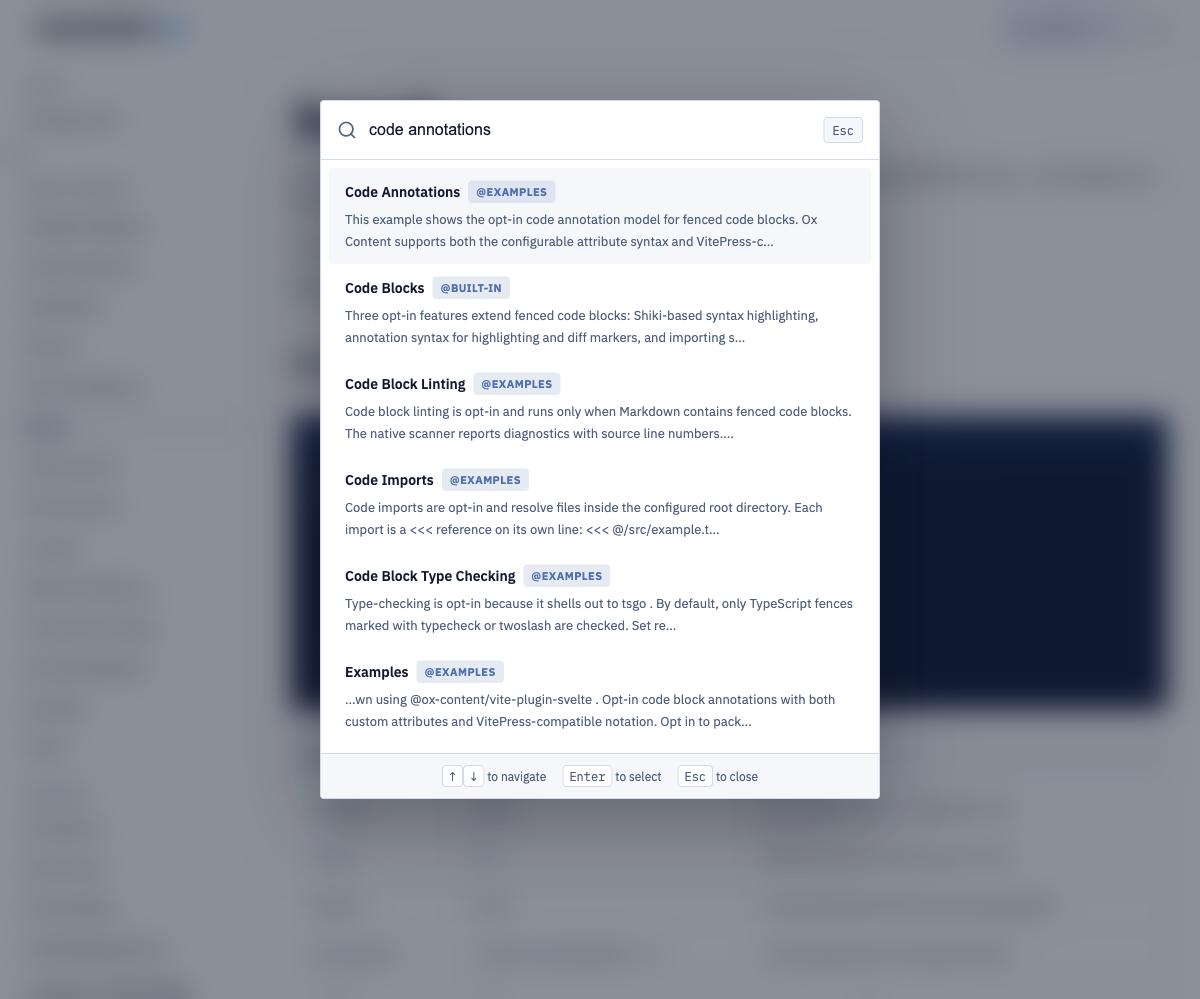
Try it on this site: press / or ⌘K, or click the search box in the header.
Configuration#
import { oxContent } from "@ox-content/vite-plugin";

export default {
  plugins: [
    oxContent({
      search: {
        limit: 8,
        hotkey: "/",
        placeholder: "Search documentation...",
      },
    }),
  ],
};
| Option | Default | Purpose |
|---|---|---|
enabled |
true |
Set search: false to disable entirely. |
limit |
10 |
Maximum results returned by the client. |
prefix |
true |
Prefix-match the last query token (typeahead). |
fuzzy |
false |
Match small typos in local BM25 results. |
placeholder |
"Search documentation..." |
Input placeholder in the default theme. |
hotkey |
"/" |
Focus hotkey; "" opts out of registration. |
provider |
"local" |
"local" keeps BM25. "hosted" is opt-in. |
The index is written to search-index.json next to the generated pages and
fetched lazily the first time a reader searches. During dev it is served from
memory and rebuilt as pages change.
When the site has more than one locale, the dialog shows a Language
<select> and defaults to the current page. All languages searches the
whole index. When documentation versions are enabled, a Version <select>
loads that version's search-index.json. Both controls are native selects, so
Tab, arrows, typeahead, Space, and Enter work without extra widgets.
Query grammar#
The Rust BM25 engine and the generated virtual:ox-content/search runtime use
the same normalized query model. That model keeps the typed text separate from
refinements so the UI can show stable chips and the engine can explain ranking.
| Query | Meaning |
|---|---|
install cli |
Terms that score exact BM25 postings. |
"static index" |
Phrase that boosts documents containing the exact text. |
render* |
Explicit prefix, even when it is not the last token. |
@api |
Scope derived from document id or URL path segments. |
scope:api |
Filter spelling for the same scope refinement. |
lang:ja |
Locale filter. language: and locale: are aliases. |
version:2.90 |
Version filter. v: is an alias. |
Unclosed quotes are parsed as phrases while the reader is typing, so the UI can
continue to render useful state during keyboard refinement and IME composition.
Hosted search receives rawQuery plus parsedQuery in the request body; local
search applies scope, locale, and version filters directly to static documents
where those values can be derived from paths.
Hosted provider#
Search stays on the local BM25 index unless provider is set to "hosted".
A hosted adapter accepts an application id, index name, and a public
search-only key from config or environment variables. Do not pass a write
or admin key. Fields named adminKey, writeKey, or apiKey are rejected.
import { oxContent } from "@ox-content/vite-plugin";

export default {
  plugins: [
    oxContent({
      search: {
        provider: "hosted",
        appId: process.env.OX_CONTENT_SEARCH_APP_ID,
        indexName: process.env.OX_CONTENT_SEARCH_INDEX_NAME,
        searchKey: process.env.OX_CONTENT_SEARCH_KEY,
        endpoint: process.env.OX_CONTENT_SEARCH_ENDPOINT,
      },
    }),
  ],
};
| Option | Source | Purpose |
|---|---|---|
appId |
config or OX_CONTENT_SEARCH_APP_ID |
Hosted application id. |
indexName |
config or OX_CONTENT_SEARCH_INDEX_NAME |
Remote index name. |
searchKey |
config or OX_CONTENT_SEARCH_KEY |
Public search-only key. |
publicKey |
config or OX_CONTENT_SEARCH_PUBLIC_KEY |
Alias for searchKey. |
endpoint |
config or OX_CONTENT_SEARCH_ENDPOINT |
HTTP URL that receives search queries. |
publicKey is an alias for searchKey. When endpoint is omitted, the
client posts to /search. The request is a JSON POST with query,
rawQuery, parsedQuery, limit, and indexName, plus x-app-id,
x-index-name, and x-search-key headers. The adapter maps hits (or
results) to the same { id, title, url, score, matches, snippet } shape as
local search and preserves metadata, ranking, and ariaLabel when the
hosted provider returns them.
If hosted search is selected but appId, indexName, or a public search
key is missing, the client fails closed: search() returns an empty array
and does not call a broken endpoint. Secrets are not logged. The local
search-index.json path is unchanged.
Placeholder and hotkey still come from searchOptions for custom UIs.
Client API#
The default SSG theme wires the search UI for you. For custom UIs, the same index is available to any client code through a virtual module:
import {
  createSearchUiState,
  parseSearchQuery,
  search,
  searchOptions,
} from "virtual:ox-content/search";

const results = await search("code annotations", { limit: 5 });
const query = parseSearchQuery('@api "static index" lang:ja');
const ui = createSearchUiState(query.raw, results);

for (const result of results) {
  // { id, title, url, score, matches, snippet, metadata, ranking, ariaLabel }
  console.log(result.title, result.url, result.snippet);
}
search(query, options?)uses local BM25 or the hosted adapter, depending onprovider.options.limit,options.prefix, andoptions.fuzzyoverride the configured defaults per call.fuzzyis local-only and stays off by default so large static indexes keep the fastest exact/prefix path.options.localekeeps results in one language when you also passlocaleCodesanddefaultLocale.versionPrefixesare stripped from document paths before the locale segment is read.searchOptionsexposes the resolved{ enabled, limit, prefix, placeholder, hotkey, provider }so a custom UI can honor the site configuration.- Scoped queries like
@api transformrestrict results to a section of the site. - Results keep the base fields and add card-ready
scopes,metadata,ranking, andariaLabel.metadataincludes section context, active filters, and derived language/version values when available.ranking.reasonscontains stable strings such astitle term match: installorbody phrase match: static index. parseSearchQuery(query)exposes the normalized terms, phrases, prefixes, filters, and scopes.createSearchUiState(query, results, options)coversempty,loading,no-results,results, andcomposingstates, and returns listbox-friendly card ids foraria-activedescendant.formatSearchResultForCard(result, index)converts local or hosted results into a stable result-card view model withrole: "option", badges, and an accessible label.
The generated local runtime has a unit-tested 36 KB byte budget. The PR
benchmark/output-size report should also include the built search-index.json
size for the docs corpus so payload growth is visible when content changes.
When search is disabled, the virtual module still resolves — search()
returns an empty array and searchOptions.enabled is false — so custom UIs
do not need conditional imports.
Related#
- Site Generation — the SSG build that hosts the default search UI.
- Theming